
Installing mod_geoip For Lighttpd On Debian Etch - Page 3
2.2 lighttpd 1.5.x
First, install all prerequisites:
apt-get install build-essential dpkg-dev fakeroot debhelper cdbs libssl-dev zlib1g-dev libbz2-dev libattr1-dev libpcre3-dev libmysqlclient15-dev libldap2-dev libfcgi-dev libgdbm-dev libmemcache-dev liblua5.1-0-dev dpatch patchutils pkg-config uuid-dev libsqlite3-dev libxml2-dev automake libtool libgeoip1 libgeoip-dev libglib2.0-dev libglib2.0-0
Then download the lighttpd sources that match your installed lighttpd, e.g. lighttpd-1.5.0-r1992:
cd /usr/local/src/
wget http://www.lighttpd.net/download/lighttpd-1.5.0-r1992.tar.gz
tar -xzf lighttpd-1.5.0-r1992.tar.gz
cd lighttpd-1.5.0/src
wget -O mod_geoip.c http://trac.lighttpd.net/trac/attachment/wiki/Docs/ModGeoip/mod_geoip.4.c?format=raw
Now open Makefile.am and after the last lib_LTLIBRARIES stanza (should be the lib_LTLIBRARIES += mod_accesslog.la stanza), add the following stanza:
vi Makefile.am
[...] lib_LTLIBRARIES += mod_geoip.la mod_geoip_la_SOURCES = mod_geoip.c mod_geoip_la_LDFLAGS = -module -export-dynamic -avoid-version -no-undefined mod_geoip_la_LIBADD = $(common_libadd) -lGeoIP [...] |
It should look like this:
[...]
lib_LTLIBRARIES += mod_accesslog.la
mod_accesslog_la_SOURCES = mod_accesslog.c
mod_accesslog_la_LDFLAGS = -module -export-dynamic -avoid-version -no-undefined
mod_accesslog_la_LIBADD = $(common_libadd)

lib_LTLIBRARIES += mod_geoip.la
mod_geoip_la_SOURCES = mod_geoip.c
mod_geoip_la_LDFLAGS = -module -export-dynamic -avoid-version -no-undefined
mod_geoip_la_LIBADD = $(common_libadd) -lGeoIP


hdr = server.h buffer.h network.h log.h keyvalue.h \
      response.h request.h fastcgi.h chunk.h filter.h \
      settings.h http_auth_digest.h \
      md5.h http_auth.h stream.h \
      fdevent.h connections.h base.h stat_cache.h \
      plugin.h mod_auth.h \
      etag.h joblist.h array.h crc32.h \
      network_backends.h configfile.h bitset.h \
      mod_ssi.h mod_ssi_expr.h inet_ntop_cache.h \
      configparser.h mod_ssi_exprparser.h \
      sys-mmap.h sys-socket.h mod_cml.h mod_cml_funcs.h \
      proc_open.h mod_sql_vhost_core.h \
      sys-files.h sys-process.h sys-strings.h  \
      iosocket.h array-static.h \
      mod_proxy_core_address.h \
      mod_proxy_core_backend.h \
      mod_proxy_core_backlog.h \
      mod_proxy_core.h  \
      mod_proxy_core_pool.h \
      mod_proxy_core_rewrites.h \
      status_counter.h \
      http_req.h \
      http_req_parser.h \
      http_req_range.h \
      http_req_range_parser.h \
      http_resp.h \
      http_resp_parser.h \
      http_parser.h \
      ajp13.h \
      mod_proxy_core_protocol.h \
      mod_magnet_cache.h \
      timing.h
[...]
|
Next do this:
cd ..
aclocal && automake -a && autoconf
./configure --with-linux-aio --libdir=/usr/lib/lighttpd --sbindir=/usr/sbin --with-openssl --with-pcre --with-bz2 --with-ldap --with-mysql --with-memcache --with-lua=lua5.1 --with-gdbm --with-attr --with-webdav-locks --with-webdav-props
make
After the make command has succesfully finished, you should find mod_geoip.so in the /usr/local/src/lighttpd-1.5.0/src/.libs directory. This is all we need so we don't need to run make install. We can continue to use our old lighttpd installation and simply copy mod_geoip.so to the directory which contains our lighttpd modules (e.g. /usr/lib/lighttpd):
cp /usr/local/src/lighttpd-1.5.0/src/.libs/mod_geoip.so /usr/lib/lighttpd
Now we must configure lighttpd to use mod_geoip. First, we download the GeoIP country database:
mkdir /usr/local/data
cd /usr/local/data
wget http://www.maxmind.com/download/geoip/database/GeoIP.dat.gz
gunzip GeoIP.dat.gz
Then open /etc/lighttpd/lighttpd.conf and add "mod_geoip", to the server.modules section; also add the geoip.db-filename and geoip.memory-cache directives below the server.modules section:
vi /etc/lighttpd/lighttpd.conf
[...]
server.modules              = (
            "mod_access",
            "mod_alias",
            "mod_accesslog",
            "mod_geoip",
            "mod_fastcgi",
#           "mod_rewrite",
#           "mod_redirect",
#           "mod_status",
#           "mod_evhost",
#           "mod_compress",
#           "mod_usertrack",
#           "mod_rrdtool",
#           "mod_webdav",
#           "mod_expire",
#           "mod_flv_streaming",
#           "mod_evasive"
 )

geoip.db-filename = "/usr/local/data/GeoIP.dat"
geoip.memory-cache = "enable"
[...]
|
Restart lighttpd:
/etc/init.d/lighttpd restart
To see if mod_geoip is working correctly, we can create a small PHP file in one of our web spaces (e.g. /var/www) (of course, PHP must be enabled in your lighttpd installation):
vi /var/www/geoiptest.php
<?php print_r($_SERVER); ?> |
Call that file in a browser, and it should display the SERVER array including values for GEOIP_COUNTRY_CODE, GEOIP_COUNTRY_CODE3, and GEOIP_COUNTRY_NAME (make sure that you're calling the file from a public IP address, not a local one).
Array
(
    [FCGI_ROLE] => RESPONDER
    [SERVER_SOFTWARE] => lighttpd/1.4.13
    [SERVER_NAME] => server1.example.com
    [GATEWAY_INTERFACE] => CGI/1.1
    [SERVER_PORT] => 80
    [SERVER_ADDR] => 192.168.0.101
    [REMOTE_PORT] => 60043
    [REMOTE_ADDR] => 1.2.3.4
    [SCRIPT_NAME] => /info.php
    [PATH_INFO] =>
    [SCRIPT_FILENAME] => /var/www/info.php
    [DOCUMENT_ROOT] => /var/www/
    [REQUEST_URI] => /info.php
    [QUERY_STRING] =>
    [REQUEST_METHOD] => GET
    [REDIRECT_STATUS] => 200
    [SERVER_PROTOCOL] => HTTP/1.1
    [HTTP_HOST] => server1.example.com
    [HTTP_USER_AGENT] => Mozilla/5.0 (Windows; U; Windows NT 5.1; en-US; rv:1.8.1.14) Gecko/20080404 Firefox/2.0.0.14
    [HTTP_ACCEPT] => text/xml,application/xml,application/xhtml+xml,text/html;q=0.9,text/plain;q=0.8,image/png,*/*;q=0.5
    [HTTP_ACCEPT_LANGUAGE] => en-us,en;q=0.5
    [HTTP_ACCEPT_ENCODING] => gzip,deflate
    [HTTP_ACCEPT_CHARSET] => ISO-8859-1,utf-8;q=0.7,*;q=0.7
    [HTTP_KEEP_ALIVE] => 300
    [HTTP_CONNECTION] => keep-alive
    [GEOIP_COUNTRY_CODE] => DE
    [GEOIP_COUNTRY_CODE3] => DEU
    [GEOIP_COUNTRY_NAME] => Germany
    [ORIG_PATH_INFO] =>
    [ORIG_SCRIPT_NAME] => /info.php
    [ORIG_SCRIPT_FILENAME] => /var/www/info.php
    [PATH_TRANSLATED] =>
    [PATH] => /sbin:/bin:/usr/sbin:/usr/bin
    [SHELL] => /bin/bash
    [USER] => root
    [PHP_FCGI_CHILDREN] => 4
    [PHP_FCGI_MAX_REQUESTS] => 10000
    [PHP_SELF] => /info.php
    [argv] => Array
        (
        )

    [argc] => 0
)
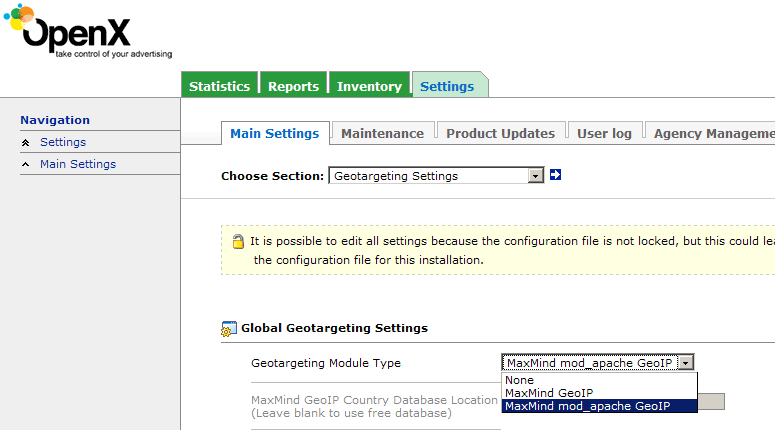
If you want to use lighttpd + mod_geoip for your OpenX ad server, make sure you select MaxMind mod_apache GeoIP under Settings > Main Settings > Geotargeting Settings. This will work for lighttod + mod_geoip as well.
3 Links
- lighttpd mod_geoip: http://trac.lighttpd.net/trac/wiki/Docs:ModGeoip
- GeoIP Databases: http://www.maxmind.com/download/geoip/database
- Debian: http://www.debian.org





