Installing mod_geoip For Lighttpd On Debian Etch
Version 1.0
Author: Falko Timme
This guide explains how to set up mod_geoip with lighttpd on a Debian Etch system. mod_geoip looks up the IP address of the client end user. This allows you to redirect or block users based on their country. You can also use this technology for your OpenX (formerly known as OpenAds or phpAdsNew) ad server to allow geo targeting. I will show two ways to build mod_geoip - the first way is to build a new lighttpd .deb package (including mod_geoip) which is the way I recommend. This works only if you have installed the standard Debian Etch lighttpd package. If you've compiled lighttpd yourself, then the second way is for you: it shows how to build mod_geoip.so for your lighttpd version.
I do not issue any guarantee that this will work for you!
Preliminary Note
I'm assuming that you have a running Debian Etch system with a working lighttpd and PHP, e.g. as shown in this tutorial: Installing Lighttpd With PHP5 And MySQL Support On Debian Etch.
1 First Way - Build A New lighttpd .deb Package
If you have installed the standard Debian Etch lighttpd package, you should use this way to build and install a new lighttpd .deb package including mod_geoip.
First, install all prerequisites:
apt-get install build-essential dpkg-dev fakeroot debhelper cdbs libssl-dev zlib1g-dev libbz2-dev libattr1-dev libpcre3-dev libmysqlclient15-dev libldap2-dev libfcgi-dev libgdbm-dev libmemcache-dev liblua5.1-0-dev dpatch patchutils pkg-config uuid-dev libsqlite3-dev libxml2-dev automake libtool libgeoip1 libgeoip-dev
Then install the lighttpd source package:
cd /usr/src
apt-get source lighttpd
Take a look at the current directory:
ls -l
server1:/usr/src# ls -l
total 828
drwxr-xr-x 8 root root   4096 2008-05-11 19:24 lighttpd-1.4.13
-rw-r--r-- 1 root src   37420 2008-04-15 10:30 lighttpd_1.4.13-4etch8.diff.gz
-rw-r--r-- 1 root src    1098 2008-04-15 10:30 lighttpd_1.4.13-4etch8.dsc
-rw-r--r-- 1 root src  793309 2007-06-01 20:15 lighttpd_1.4.13.orig.tar.gz
server1:/usr/src#
As you see, we now have the sources of lighttpd 1.4.13 (from which the standard lighttpd package for Debian Etch was built).
Let's go on:
cd lighttpd-1.4.13/src/
wget -O mod_geoip.c http://trac.lighttpd.net/trac/attachment/wiki/Docs/ModGeoip/mod_geoip.5.c?format=raw
http://trac.lighttpd.net/trac/attachment/wiki/Docs/ModGeoip/mod_geoip.5.c?format=raw is for lighttpd 1.4.x. For lighttpd 1.5.x, you'd have to download http://trac.lighttpd.net/trac/attachment/wiki/Docs/ModGeoip/mod_geoip.4.c?format=raw instead.
Now open Makefile.am and after the last lib_LTLIBRARIES stanza (should be the lib_LTLIBRARIES += mod_accesslog.la stanza), add the following stanza:
vi Makefile.am
[...] lib_LTLIBRARIES += mod_geoip.la mod_geoip_la_SOURCES = mod_geoip.c mod_geoip_la_LDFLAGS = -module -export-dynamic -avoid-version -no-undefined mod_geoip_la_LIBADD = $(common_libadd) -lGeoIP [...] |
It should look like this:
[...]
lib_LTLIBRARIES += mod_accesslog.la
mod_accesslog_la_SOURCES = mod_accesslog.c
mod_accesslog_la_LDFLAGS = -module -export-dynamic -avoid-version -no-undefined
mod_accesslog_la_LIBADD = $(common_libadd)

lib_LTLIBRARIES += mod_geoip.la
mod_geoip_la_SOURCES = mod_geoip.c
mod_geoip_la_LDFLAGS = -module -export-dynamic -avoid-version -no-undefined
mod_geoip_la_LIBADD = $(common_libadd) -lGeoIP


hdr = server.h buffer.h network.h log.h keyvalue.h \
      response.h request.h fastcgi.h chunk.h \
      settings.h http_chunk.h http_auth_digest.h \
      md5.h http_auth.h stream.h \
      fdevent.h connections.h base.h stat_cache.h \
      plugin.h mod_auth.h \
      etag.h joblist.h array.h crc32.h \
      network_backends.h configfile.h bitset.h \
      mod_ssi.h mod_ssi_expr.h inet_ntop_cache.h \
      configparser.h mod_ssi_exprparser.h \
      sys-mmap.h sys-socket.h mod_cml.h mod_cml_funcs.h \
      splaytree.h proc_open.h status_counter.h \
      mod_magnet_cache.h
[...]
|
Now go to the ../debian folder:
cd ../debian/
Open lighttpd.install and add the line debian/tmp/usr/lib/lighttpd/mod_geoip.so to it:
vi lighttpd.install
[...] debian/tmp/usr/lib/lighttpd/mod_flv_streaming.so debian/tmp/usr/lib/lighttpd/mod_geoip.so debian/tmp/usr/lib/lighttpd/mod_indexfile.so [...] |
That's it. Now we can build the new lighttpd .deb package:
cd ../
aclocal && automake -a && autoconf
dpkg-buildpackage
(At the end of the build process, you'll most likely see the following warnings which you can ignore:
 dpkg-genchanges
dpkg-genchanges: not including original source code in upload
dpkg-buildpackage: binary and diff upload (original source NOT included)
(WARNING: Failed to sign .dsc and .changes file)
server1:/usr/src/lighttpd-1.4.13#
)
Now go to the /usr/src directory and check its content:
cd /usr/src/
ls -l
server1:/usr/src# ls -l
total 1748
drwxr-xr-x 8 root root   4096 2008-05-11 19:27 lighttpd-1.4.13
-rw-r--r-- 1 root src  222401 2008-05-11 19:26 lighttpd_1.4.13-4etch8.diff.gz
-rw-r--r-- 1 root src     862 2008-05-11 19:26 lighttpd_1.4.13-4etch8.dsc
-rw-r--r-- 1 root src    1944 2008-05-11 19:30 lighttpd_1.4.13-4etch8_i386.changes
-rw-r--r-- 1 root src  290640 2008-05-11 19:30 lighttpd_1.4.13-4etch8_i386.deb
-rw-r--r-- 1 root src  793309 2007-06-01 20:15 lighttpd_1.4.13.orig.tar.gz
-rw-r--r-- 1 root src  100106 2008-05-11 19:29 lighttpd-doc_1.4.13-4etch8_all.deb
-rw-r--r-- 1 root src   63650 2008-05-11 19:30 lighttpd-mod-cml_1.4.13-4etch8_i386.deb
-rw-r--r-- 1 root src   63462 2008-05-11 19:30 lighttpd-mod-magnet_1.4.13-4etch8_i386.deb
-rw-r--r-- 1 root src   59042 2008-05-11 19:30 lighttpd-mod-mysql-vhost_1.4.13-4etch8_i386.deb
-rw-r--r-- 1 root src   60712 2008-05-11 19:30 lighttpd-mod-trigger-b4-dl_1.4.13-4etch8_i386.deb
-rw-r--r-- 1 root src   70758 2008-05-11 19:30 lighttpd-mod-webdav_1.4.13-4etch8_i386.deb
server1:/usr/src#
As you see, we now have new lighttpd .deb packages in that directory. Install the new lighttpd with mod_geoip as follows:
dpkg -i lighttpd_1.4.13-4etch8_i386.deb
Now we must configure lighttpd to use mod_geoip. First, we download the GeoIP country database:
mkdir /usr/local/data
cd /usr/local/data
wget http://www.maxmind.com/download/geoip/database/GeoIP.dat.gz
gunzip GeoIP.dat.gz
Then open /etc/lighttpd/lighttpd.conf and add "mod_geoip", to the server.modules section; also add the geoip.db-filename and geoip.memory-cache directives below the server.modules section:
vi /etc/lighttpd/lighttpd.conf
[...]
server.modules              = (
            "mod_access",
            "mod_alias",
            "mod_accesslog",
            "mod_geoip",
            "mod_fastcgi",
#           "mod_rewrite",
#           "mod_redirect",
#           "mod_status",
#           "mod_evhost",
#           "mod_compress",
#           "mod_usertrack",
#           "mod_rrdtool",
#           "mod_webdav",
#           "mod_expire",
#           "mod_flv_streaming",
#           "mod_evasive"
 )

geoip.db-filename = "/usr/local/data/GeoIP.dat"
geoip.memory-cache = "enable"
[...]
|
Restart lighttpd:
/etc/init.d/lighttpd restart
To see if mod_geoip is working correctly, we can create a small PHP file in one of our web spaces (e.g. /var/www) (of course, PHP must be enabled in your lighttpd installation):
vi /var/www/geoiptest.php
<?php print_r($_SERVER); ?> |
Call that file in a browser, and it should display the SERVER array including values for GEOIP_COUNTRY_CODE, GEOIP_COUNTRY_CODE3, and GEOIP_COUNTRY_NAME (make sure that you're calling the file from a public IP address, not a local one).
Array
(
    [FCGI_ROLE] => RESPONDER
    [SERVER_SOFTWARE] => lighttpd/1.4.13
    [SERVER_NAME] => server1.example.com
    [GATEWAY_INTERFACE] => CGI/1.1
    [SERVER_PORT] => 80
    [SERVER_ADDR] => 192.168.0.101
    [REMOTE_PORT] => 60043
    [REMOTE_ADDR] => 1.2.3.4
    [SCRIPT_NAME] => /info.php
    [PATH_INFO] =>
    [SCRIPT_FILENAME] => /var/www/info.php
    [DOCUMENT_ROOT] => /var/www/
    [REQUEST_URI] => /info.php
    [QUERY_STRING] =>
    [REQUEST_METHOD] => GET
    [REDIRECT_STATUS] => 200
    [SERVER_PROTOCOL] => HTTP/1.1
    [HTTP_HOST] => server1.example.com
    [HTTP_USER_AGENT] => Mozilla/5.0 (Windows; U; Windows NT 5.1; en-US; rv:1.8.1.14) Gecko/20080404 Firefox/2.0.0.14
    [HTTP_ACCEPT] => text/xml,application/xml,application/xhtml+xml,text/html;q=0.9,text/plain;q=0.8,image/png,*/*;q=0.5
    [HTTP_ACCEPT_LANGUAGE] => en-us,en;q=0.5
    [HTTP_ACCEPT_ENCODING] => gzip,deflate
    [HTTP_ACCEPT_CHARSET] => ISO-8859-1,utf-8;q=0.7,*;q=0.7
    [HTTP_KEEP_ALIVE] => 300
    [HTTP_CONNECTION] => keep-alive
    [GEOIP_COUNTRY_CODE] => DE
    [GEOIP_COUNTRY_CODE3] => DEU
    [GEOIP_COUNTRY_NAME] => Germany
    [ORIG_PATH_INFO] =>
    [ORIG_SCRIPT_NAME] => /info.php
    [ORIG_SCRIPT_FILENAME] => /var/www/info.php
    [PATH_TRANSLATED] =>
    [PATH] => /sbin:/bin:/usr/sbin:/usr/bin
    [SHELL] => /bin/bash
    [USER] => root
    [PHP_FCGI_CHILDREN] => 4
    [PHP_FCGI_MAX_REQUESTS] => 10000
    [PHP_SELF] => /info.php
    [argv] => Array
        (
        )

    [argc] => 0
)
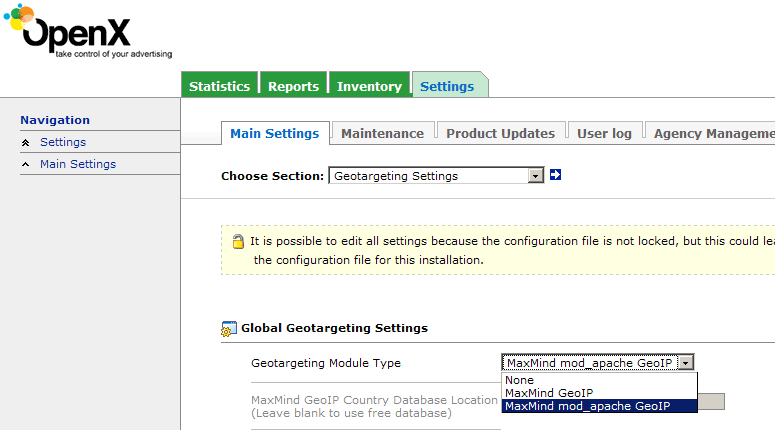
If you want to use lighttpd + mod_geoip for your OpenX ad server, make sure you select MaxMind mod_apache GeoIP under Settings > Main Settings > Geotargeting Settings. This will work for lighttod + mod_geoip as well.