Installing mod_geoip For Lighttpd On Debian Etch - Page 2
2 Second Way - Building mod_geoip From The Sources
If you've compiled lighttpd yourself, you should choose one of the following chapters. If you're using lighttpd 1.4.x, follow chapter 2.1, for lighttpd 1.5.x use chapter 2.2.
2.1 lighttpd 1.4.x
First, install all prerequisites:
apt-get install build-essential dpkg-dev fakeroot debhelper cdbs libssl-dev zlib1g-dev libbz2-dev libattr1-dev libpcre3-dev libmysqlclient15-dev libldap2-dev libfcgi-dev libgdbm-dev libmemcache-dev liblua5.1-0-dev dpatch patchutils pkg-config uuid-dev libsqlite3-dev libxml2-dev automake libtool libgeoip1 libgeoip-dev
Then download the lighttpd sources that match your installed lighttpd, e.g. 1.4.13:
cd /usr/local/src/
wget http://www.lighttpd.net/download/lighttpd-1.4.13.tar.gz
tar -xzf lighttpd-1.4.13.tar.gz
cd lighttpd-1.4.13/src
wget -O mod_geoip.c http://trac.lighttpd.net/trac/attachment/wiki/Docs/ModGeoip/mod_geoip.5.c?format=raw
Now open Makefile.am and after the last lib_LTLIBRARIES stanza (should be the lib_LTLIBRARIES += mod_accesslog.la stanza), add the following stanza:
vi Makefile.am
[...] lib_LTLIBRARIES += mod_geoip.la mod_geoip_la_SOURCES = mod_geoip.c mod_geoip_la_LDFLAGS = -module -export-dynamic -avoid-version -no-undefined mod_geoip_la_LIBADD = $(common_libadd) -lGeoIP [...] |
It should look like this:
[...]
lib_LTLIBRARIES += mod_accesslog.la
mod_accesslog_la_SOURCES = mod_accesslog.c
mod_accesslog_la_LDFLAGS = -module -export-dynamic -avoid-version -no-undefined
mod_accesslog_la_LIBADD = $(common_libadd)

lib_LTLIBRARIES += mod_geoip.la
mod_geoip_la_SOURCES = mod_geoip.c
mod_geoip_la_LDFLAGS = -module -export-dynamic -avoid-version -no-undefined
mod_geoip_la_LIBADD = $(common_libadd) -lGeoIP


hdr = server.h buffer.h network.h log.h keyvalue.h \
      response.h request.h fastcgi.h chunk.h \
      settings.h http_chunk.h http_auth_digest.h \
      md5.h http_auth.h stream.h \
      fdevent.h connections.h base.h stat_cache.h \
      plugin.h mod_auth.h \
      etag.h joblist.h array.h crc32.h \
      network_backends.h configfile.h bitset.h \
      mod_ssi.h mod_ssi_expr.h inet_ntop_cache.h \
      configparser.h mod_ssi_exprparser.h \
      sys-mmap.h sys-socket.h mod_cml.h mod_cml_funcs.h \
      splaytree.h proc_open.h status_counter.h \
      mod_magnet_cache.h
[...]
|
Next do this:
cd ..
aclocal && automake -a && autoconf
./configure --with-linux-aio --libdir=/usr/lib/lighttpd --sbindir=/usr/sbin --with-openssl --with-pcre --with-bz2 --with-ldap --with-mysql --with-memcache --with-lua=lua5.1 --with-gdbm --with-attr --with-webdav-locks --with-webdav-props
make
After the make command has succesfully finished, you should find mod_geoip.so in the /usr/local/src/lighttpd-1.4.13/src/.libs directory. This is all we need so we don't need to run make install. We can continue to use our old lighttpd installation and simply copy mod_geoip.so to the directory which contains our lighttpd modules (e.g. /usr/lib/lighttpd):
cp /usr/local/src/lighttpd-1.4.13/src/.libs/mod_geoip.so /usr/lib/lighttpd
Now we must configure lighttpd to use mod_geoip. First, we download the GeoIP country database:
mkdir /usr/local/data
cd /usr/local/data
wget http://www.maxmind.com/download/geoip/database/GeoIP.dat.gz
gunzip GeoIP.dat.gz
Then open /etc/lighttpd/lighttpd.conf and add "mod_geoip", to the server.modules section; also add the geoip.db-filename and geoip.memory-cache directives below the server.modules section:
vi /etc/lighttpd/lighttpd.conf
[...]
server.modules              = (
            "mod_access",
            "mod_alias",
            "mod_accesslog",
            "mod_geoip",
            "mod_fastcgi",
#           "mod_rewrite",
#           "mod_redirect",
#           "mod_status",
#           "mod_evhost",
#           "mod_compress",
#           "mod_usertrack",
#           "mod_rrdtool",
#           "mod_webdav",
#           "mod_expire",
#           "mod_flv_streaming",
#           "mod_evasive"
 )

geoip.db-filename = "/usr/local/data/GeoIP.dat"
geoip.memory-cache = "enable"
[...]
|
Restart lighttpd:
/etc/init.d/lighttpd restart
To see if mod_geoip is working correctly, we can create a small PHP file in one of our web spaces (e.g. /var/www) (of course, PHP must be enabled in your lighttpd installation):
vi /var/www/geoiptest.php
<?php print_r($_SERVER); ?> |
Call that file in a browser, and it should display the SERVER array including values for GEOIP_COUNTRY_CODE, GEOIP_COUNTRY_CODE3, and GEOIP_COUNTRY_NAME (make sure that you're calling the file from a public IP address, not a local one).
Array
(
    [FCGI_ROLE] => RESPONDER
    [SERVER_SOFTWARE] => lighttpd/1.4.13
    [SERVER_NAME] => server1.example.com
    [GATEWAY_INTERFACE] => CGI/1.1
    [SERVER_PORT] => 80
    [SERVER_ADDR] => 192.168.0.101
    [REMOTE_PORT] => 60043
    [REMOTE_ADDR] => 1.2.3.4
    [SCRIPT_NAME] => /info.php
    [PATH_INFO] =>
    [SCRIPT_FILENAME] => /var/www/info.php
    [DOCUMENT_ROOT] => /var/www/
    [REQUEST_URI] => /info.php
    [QUERY_STRING] =>
    [REQUEST_METHOD] => GET
    [REDIRECT_STATUS] => 200
    [SERVER_PROTOCOL] => HTTP/1.1
    [HTTP_HOST] => server1.example.com
    [HTTP_USER_AGENT] => Mozilla/5.0 (Windows; U; Windows NT 5.1; en-US; rv:1.8.1.14) Gecko/20080404 Firefox/2.0.0.14
    [HTTP_ACCEPT] => text/xml,application/xml,application/xhtml+xml,text/html;q=0.9,text/plain;q=0.8,image/png,*/*;q=0.5
    [HTTP_ACCEPT_LANGUAGE] => en-us,en;q=0.5
    [HTTP_ACCEPT_ENCODING] => gzip,deflate
    [HTTP_ACCEPT_CHARSET] => ISO-8859-1,utf-8;q=0.7,*;q=0.7
    [HTTP_KEEP_ALIVE] => 300
    [HTTP_CONNECTION] => keep-alive
    [GEOIP_COUNTRY_CODE] => DE
    [GEOIP_COUNTRY_CODE3] => DEU
    [GEOIP_COUNTRY_NAME] => Germany
    [ORIG_PATH_INFO] =>
    [ORIG_SCRIPT_NAME] => /info.php
    [ORIG_SCRIPT_FILENAME] => /var/www/info.php
    [PATH_TRANSLATED] =>
    [PATH] => /sbin:/bin:/usr/sbin:/usr/bin
    [SHELL] => /bin/bash
    [USER] => root
    [PHP_FCGI_CHILDREN] => 4
    [PHP_FCGI_MAX_REQUESTS] => 10000
    [PHP_SELF] => /info.php
    [argv] => Array
        (
        )

    [argc] => 0
)
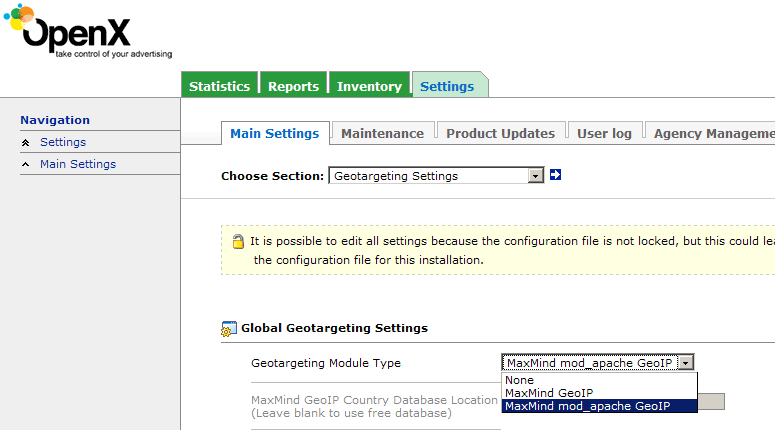
If you want to use lighttpd + mod_geoip for your OpenX ad server, make sure you select MaxMind mod_apache GeoIP under Settings > Main Settings > Geotargeting Settings. This will work for lighttod + mod_geoip as well.