Video Surveillance With ZoneMinder On Ubuntu

Do you like HowtoForge? Please consider supporting us by becoming a subscriber.
Submitted by wisu (Contact Author) (Forums) on Fri, 2007-09-07 15:19. :: Ubuntu

Video Surveillance With ZoneMinder On Ubuntu

ZoneMinder is the top Linux video camera security and surveillance solution. In this document I will cover how to get ZoneMinder up and running on Ubuntu 6.06.1 LTS or Dapper Drake with the recent updates included.


Hardware Requirements

The surveillance system I am covering here utilizes 4 Dome CCTV cameras hooked up to a single Kodicom kmc-8800 capture card, in addition I also used infrared LEDs so my cameras could see in the dark (honestly I'm abit scared to look). ZoneMinder also does a good job with IP Cameras, unfortunatly they are considerably expensive in my part of the world, hence 4 cameras would blow my budget.

For an in-depth guide of supported hardware one may refer to this link http://www.zoneminder.com/wiki/index.php/Supported_hardware.

In building a system like this one must be aware that it would be storage hungry, therefore an LVM partitioning scheme would be wise to anticipate growth of the system.

In my experience a rig with 4 cameras clogged up my Pentium 4 1,7GHz test system therefore on a production system I used the following resources.

egrep "processor|name" /proc/cpuinfo

processor : 0
model name : Intel(R) Pentium(R) 4 CPU 3.06GHz
processor : 1
model name : Intel(R) Pentium(R) 4 CPU 3.06GHz

cat /proc/meminfo | grep MemTot

MemTotal: 515264 kB

First step after assembly of hardware and strategically placing each CCTV camera, is the Operating System installation. Here I installed a base system without any X-window.

Then we must set an static IP for the system:

cat /etc/network/interfaces

auto lo
iface lo inet loopback
auto eth0
iface eth0 inet static
address 192.168.1.202
netmask 255.255.255.0
gateway 192.168.1.1

cat /etc/hosts | grep cctv

192.168.1.202 cctv.bigwisu.com cctv

Then we edit the /etc/apt/source.list to include mulitverse and universe repositories.

deb http://id.archive.ubuntu.com/ubuntu/ dapper main restricted multiverse universe

Afterwards we update and upgrade our system:

sudo apt-get update
sudo apt-get upgrade

In my setup a reboot was required. Next step after reboot is to install Apache, php and MySQL:

sudo apt-get install apache2 php5-mysql libapache2-mod-php5 mysql-server

Then we need to install the following applications and libraries:

sudo apt-get install ffmpeg libarchive-tar-perl libarchive-zip-perl libdate-manip-perl libdevice-serialport-perl

sudo apt-get install libjpeg62 libmime-perl libstdc++6 libwww-perl zlib1g

Afterwards we download the .deb from the maintainer website:

wget ftp://www.northern-ridge.com.au/zoneminder/ubuntu/dapper/zoneminder_1.22.3-8_i386.deb

Next we install it with the following command:

sudo dpkg -i zoneminder_1.22.3-8_i386.deb

My system had a few dependancy errors, therfore I ran:

sudo apt-get -f install

which automagically fixed any problems.

Here we have already installed all the required packages, next we need some configuration.

First we configure Apache:

sudo ln -s /etc/zm/apache.conf /etc/apache2/conf.d/zoneminder.conf
sudo /etc/init.d/apache2 force-reload

This surveillance application is run by the apache, therefore to enable access to the Video device we must add www-data to the video group:

sudo adduser www-data video

Now we can access the ZoneMinder GUI, from our favorite browser we type in the URL:

http://IP_ADDRESS_CCTV_SYSTEM/zm

From this interface first step is to add cameras:
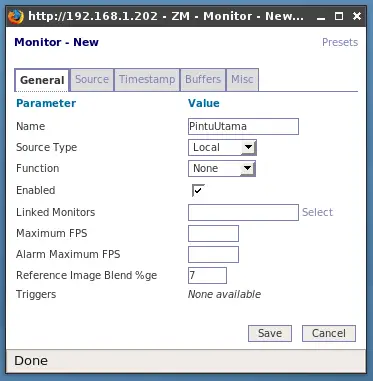
CCTV New Video 1

Here we specify the device, dimension and color:
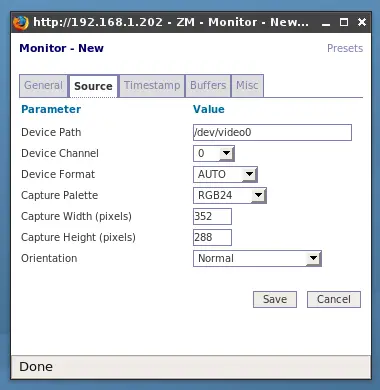
CCTV New Video 2

Result of the newly added camera:

CCTV New Video 3
Click to enlarge

Then we tell ZoneMinder how to process captured images:
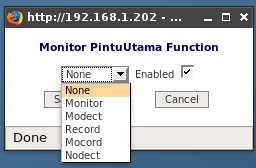
CCTV New Video Options

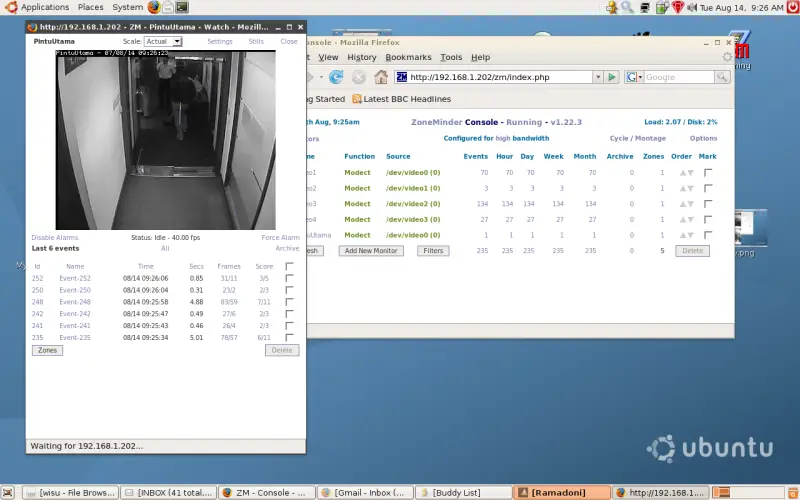
In my case I chose to Motion Detect my system, where recording will only take place upon movement.

I can also choose which area to monitor for movement, here is a sample on the main entrance:
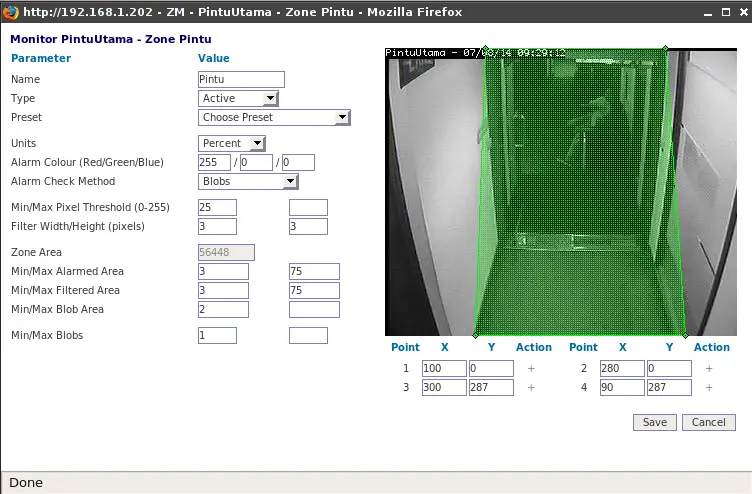
CCTV Motion Detect Zone
Click to enlarge

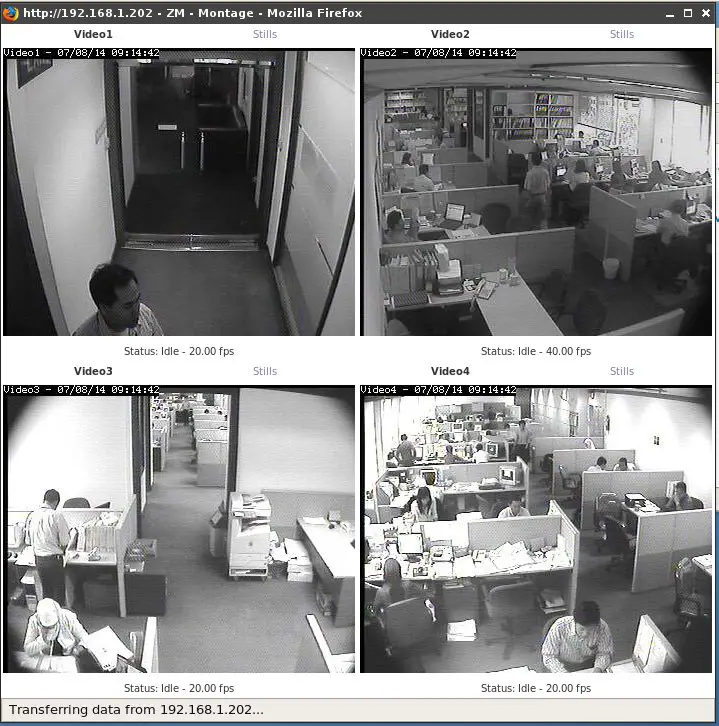
Here is my 4 camera CCTV system:

CCTV Montage
Click to enlarge

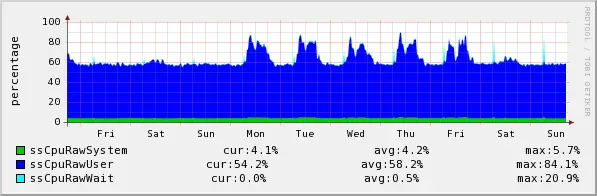
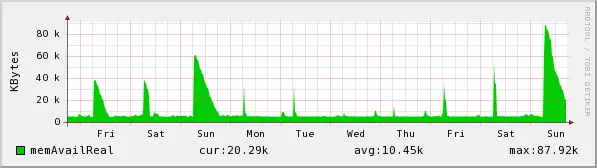
It requires resources as follows:

CCTV CPU Utilization
Click to enlarge
CCTV Utilization RAM
Click to enlarge

Please do not use the comment function to ask for help! If you need help, please use our forum.
Comments will be published after administrator approval.
Submitted by Steve (not registered) on Sat, 2009-07-11 23:21.

After finally getting ZM working with Ubuntu, I've added a tutorial at http://www.zoneminder.com/wiki/index.php/Ubuntu_9.04_Jaunty_desktop_with_graphical_interface which addresses some of the problems we ran into, which hopefully will help others too.  I thought I'd link to it from here as this seems to be a popular tutorial and hopefully my extra hints will complement it.  Good luck!

Steve

Submitted by Mike (not registered) on Fri, 2009-08-28 02:42.

Thank you for this tutorial

Submitted by Jarrod (not registered) on Fri, 2009-05-08 02:52.

New versions are also available, give this one a shot:

ftp://www.northern-ridge.com.au/zoneminder/1.24/ubuntu/9.04/zoneminder_1.24.1-pre-1_i386.deb

For a directory listing goto ftp://www.northern-ridge.com.au/zoneminder/


Submitted by Steve (not registered) on Fri, 2009-03-20 18:16.

I'm a newbie in terms of setting up video surveillance using a linux system so please bear with me.

How well does this setup work at recording the video feeds from all four cameras?  Is this only a monitoring station or can it be used to record the feeds to a large enough hard drive installed on the system?

 I'm looking for a cheaper solution then shelling out the $$ for a full on DVR surveillance system.

Thanks...very cool page.


Submitted by Anonymous (not registered) on Mon, 2009-02-23 18:47.

Thanks for the page! 

But, couldn't most of your from-source instructions be replaced with a simple apt-get call?

sudo apt-get install zoneminder

Your last two command line instructions, however, I found to be very much necessary.

 sudo ln -s /etc/zm/apache.conf /etc/apache2/conf.d/zoneminder.conf

 sudo adduser www-data video

(I executed this first one, then lost track of this web page, spent hours trying to debug the black screen "shared memory not initialized by capture daemon" / "shared memory not valid" / "can't get shared memory id"  issues and finally found that I could fix them with "chmod 606 /dev/video0"... but turns out that your adduser fix is the more appropriate fix )

 Everything appears to be working now!  Thanks!

Submitted by Remote Camera (not registered) on Wed, 2009-05-27 14:22.

Hi 

Sorry for ask from here 

how can i fix these errors ? Please


 zmwatch.log

05/27/09 15:03:01.020779 zmwatch[2716].ERR [Can't get shared memory id '7a6d0001', 1: No such file or directory]
05/27/09 15:03:11.021439 zmwatch[2716].ERR [Can't get shared memory id '7a6d0001', 1: No such file or directory]
05/27/09 15:03:21.022613 zmwatch[2716].ERR [Can't get shared memory id '7a6d0001', 1: No such file or directory]

zm_Debug.log

05/27/09 16:12:42.088896 zmc_m1[8860].INF-zm_debug.c/292 [New Debug Level = 0, New Debug Log = /tmp/zm_debug.log.08860]
05/27/09 16:12:42.105799 zmc_m1[8860].INF-zmc.cpp/186 [Starting Capture]
05/27/09 16:12:42.271182 zmc_m1[8860].ERR-zm_remote_camera_http.cpp/99 [Can't connect to remote camera: No route to host]
05/27/09 16:12:42.271250 zmc_m1[8860].ERR-zm_remote_camera_http.cpp/1019 [Unable to connect to camera]
05/27/09 16:12:42.271269 zmc_m1[8860].ERR-zmc.cpp/251 [Failed to pre-capture monitor 1 (0/1)]

 zmdc.log

05/27/09 15:02:07.316738 zmdc[2686].INF [Server starting at 09/05/27 15:02:07]
05/27/09 15:02:10.447738 zmdc[2686].INF ['zmc -m 1' starting at 09/05/27 15:02:10, pid = 2708]
05/27/09 15:02:10.554589 zmdc[2686].ERR ['zmc -m 1' exited abnormally, exit status 255]
05/27/09 15:02:10.554802 zmdc[2686].INF [Starting pending process, zmc -m 1]

Submitted by Carlo (not registered) on Thu, 2009-06-04 12:12.

For shared memory related problems see the short page

http://www.riccardotempesta.com/informatica/53-zoneminder-e-shared-memory

 Carlo

Submitted by Mamunk2 (not registered) on Mon, 2008-11-24 08:51.

Hi,

I was trying to follow this instruction!

But when I type the following command in the terminal

wget ftp://www.northern-ridge.com.au/zoneminder/ubuntu/dapper/zoneminder_1.22.3-8_i386.deb

then the following result shown


$ wget ftps://www.northern-ridge.com.au/zoneminder/ubuntu/dapper/zoneminder_1.22.3-8_i386.deb
ftps://www.northern-ridge.com.au/zoneminder/ubuntu/dapper/zoneminder_1.22.3-8_i386.deb: Unsupported scheme.
mamunk2@mamunk2-laptop:~$ wget ftp://www.northern-ridge.com.au/zoneminder/ubuntu/dapper/zoneminder_1.22.3-8_i386.deb
--07:46:43--  ftp://www.northern-ridge.com.au/zoneminder/ubuntu/dapper/zoneminder_1.22.3-8_i386.deb
           => `zoneminder_1.22.3-8_i386.deb'
Resolving www.northern-ridge.com.au... 202.61.194.152
Connecting to www.northern-ridge.com.au|202.61.194.152|:21... connected.
Logging in as anonymous ... Logged in!
==> SYST ... done.    ==> PWD ... done.
==> TYPE I ... done.  ==> CWD /zoneminder/ubuntu/dapper ...
No such directory `zoneminder/ubuntu/dapper'.

Could you tell me whats wrong there?

Thanks

Mamun
 

Submitted by Gio (not registered) on Mon, 2008-12-15 06:05.

looks like the directories are different now...i did alittle investigating and it seems that the correct link in that line would be

ftp://www.northern-ridge.com.au/zoneminder/1.22.3/ubuntu/dapper/zoneminder_1.22.3-10_i386.deb

Submitted by Bob (not registered) on Sun, 2008-09-14 13:27.

Thank you.

For the clear instructions.

For the actual commands which I cut and pasted.

For my successful install.

Been trying for 3 days to get Zoneminder to work with no luck until now.

Thanks again

Submitted by Leszek (registered user) on Fri, 2007-09-07 18:07.

Hi!

This tutorial seems to be nice but the images are to small to see anything on them. 

Submitted by wisu (registered user) on Sun, 2007-09-09 15:14.

Agreed!!!

Should be large enough now... Thanks 

Submitted by Franck (not registered) on Mon, 2009-09-07 10:09.

This tutorial seems really nice and will be usefull for my video surveillance company

Sponsored Links: Unified Communications: Thoughts, Strategies and Predictions
Join the discussion.
www.seamlessenterprise.com

IP Convergence
Integrate your wireless and wireline networks.
Learn how from the experts at Sprint.
www.seamlessenterprise.com

Wireless & Wireline Integration
Thoughts, strategies and solutions: join the discussion
www.seamlessenterprise.com

Unified Communications 2009
Join the Discussion. Now.
www.seamlessenterprise.com