
The Perfect Desktop - Ubuntu 8.10 (Intrepid Ibex) - Page 3
This tutorial exists for these OS versions
- Ubuntu 14.10 (Utopic Unicorn)
- Ubuntu 13.10 (Saucy Salamander)
- Ubuntu 14.04 LTS (Trusty Tahr)
- Ubuntu 13.04 (Raring Ringtail)
- Ubuntu 12.10 (Quantal Quetzal)
- Ubuntu 12.04 LTS (Precise Pangolin)
On this page
6 Install Additional Software
To install additional applications, you can either open the Synaptic Package Manager (System> Administration > Synaptic Package Manager) or the command line.
There's a bug in Ubuntu 8.10 which prevents Synaptic from displaying packages from third-party repositories. If you want to use Synaptic to install the additional applications, you must open a terminal first (Applications > Accessories > Terminal) and run
sudo update-apt-xapian-index
Afterwards you can start Synaptic and install the following packages (please search for acroread first - if Synaptic doesn't find it, use the command line; see below):
- amarok
- flashplugin-nonfree
- amule
- audacity
- azureus
- banshee
- bluefish
- dvdrip
- filezilla
- msttcorefonts
- gnucash
- gstreamer*
- gtkpod-aac
- sun-java6* (except sun-java6-doc)
- k3b
- kino
- mplayer
- mozilla-mplayer
- quanta
- kompozer
- scribus
- vlc*
- xchat-gnome
- xmms2*
- bittornado
- bittornado-gui
- sound-juicer
- helix-player
- mozilla-helix-player
- googleearth
- acroread
- mozilla-acroread
- non-free-codecs
- ubuntu-restricted-extras
- libdvdcss2
- opera
- xine-ui
- xine-plugin
- thunderbird
- skype
If you want to install the applications from the command line, open a terminal (Applications > Accessories > Terminal) and install the packages with one single command:
sudo apt-get install amarok flashplugin-nonfree amule audacity azureus banshee bluefish dvdrip filezilla msttcorefonts gnucash gstreamer* gtkpod-aac sun-java6-bin sun-java6-javadb sun-java6-jdk sun-java6-jre sun-java6-plugin k3b kino mplayer mozilla-mplayer quanta kompozer scribus xchat-gnome bittornado bittornado-gui sound-juicer helix-player mozilla-helix-player googleearth acroread mozilla-acroread non-free-codecs ubuntu-restricted-extras libdvdcss2 opera xine-ui xine-plugin xmms2 xmms2tray xmms2-plugin-airplay xmms2-plugin-alsa xmms2-plugin-ao xmms2-plugin-asf xmms2-plugin-asx xmms2-plugin-avcodec xmms2-plugin-cdda xmms2-plugin-cue xmms2-plugin-curl xmms2-plugin-daap xmms2-plugin-faad xmms2-plugin-flac xmms2-plugin-gme xmms2-plugin-gvfs xmms2-plugin-ices xmms2-plugin-icymetaint xmms2-plugin-id3v2 xmms2-plugin-jack xmms2-plugin-karaoke xmms2-plugin-lastfm xmms2-plugin-m3u xmms2-plugin-mad xmms2-plugin-mms xmms2-plugin-modplug xmms2-plugin-mp4 xmms2-plugin-musepack xmms2-plugin-normalize xmms2-plugin-ofa xmms2-plugin-oss xmms2-plugin-pls xmms2-plugin-pulse xmms2-plugin-rss xmms2-plugin-sid xmms2-plugin-smb xmms2-plugin-speex xmms2-plugin-vocoder xmms2-plugin-vorbis xmms2-plugin-wma xmms2-plugin-xml xmms2-plugin-xspf vlc vlc-data vlc-dbg vlc-nox vlc-plugin-arts vlc-plugin-esd vlc-plugin-ggi vlc-plugin-jack vlc-plugin-pulse vlc-plugin-sdl vlc-plugin-svgalib thunderbird skype
(This must go into one line!)
7 Flash Player
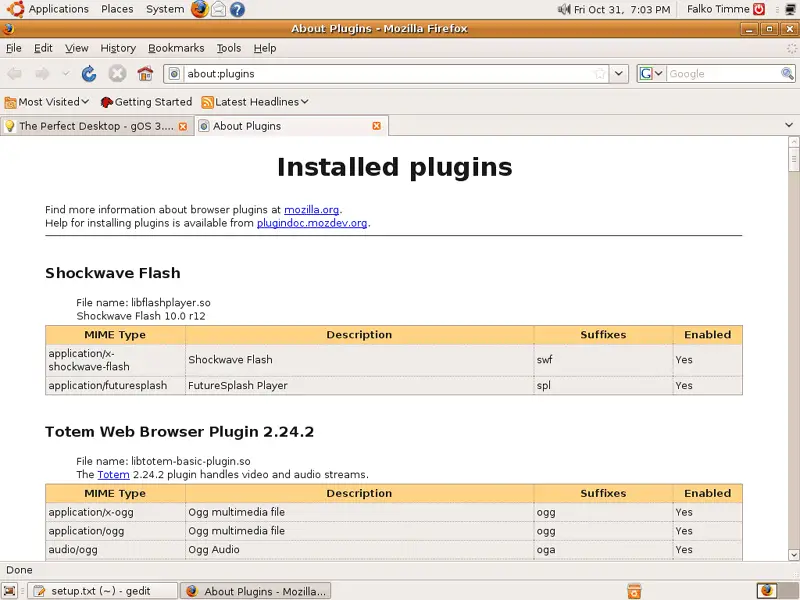
To see if the Flash Player has been installed correctly, open Firefox and type about:plugins in the address bar. Firefox will then list all installed plugins, and it should list the Flash Player (version 10.0r12) among them:
8 TrueType Fonts
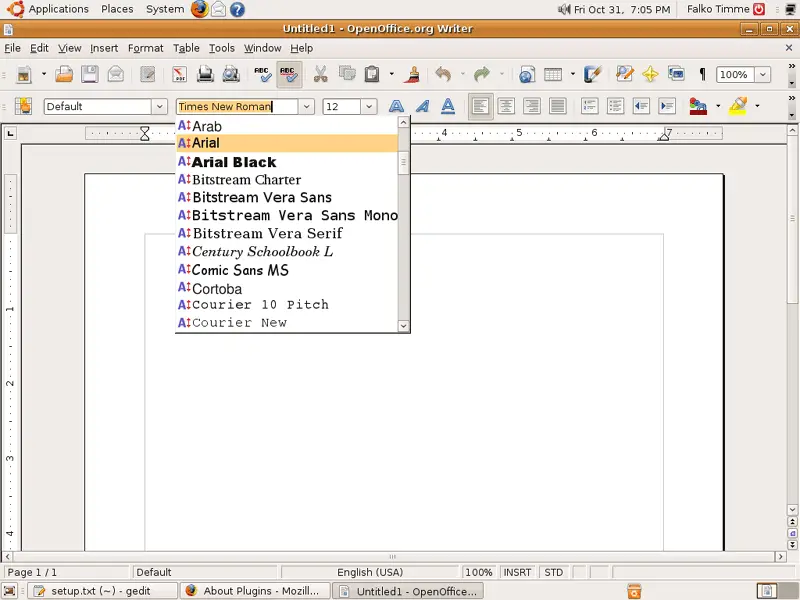
To check if the TrueType fonts have been installed correctly, open a word processor like OpenOffice. You should now find your new Windows fonts there:
9 Inventory (II)
Now let's check again what we have so far by browsing the menus again:
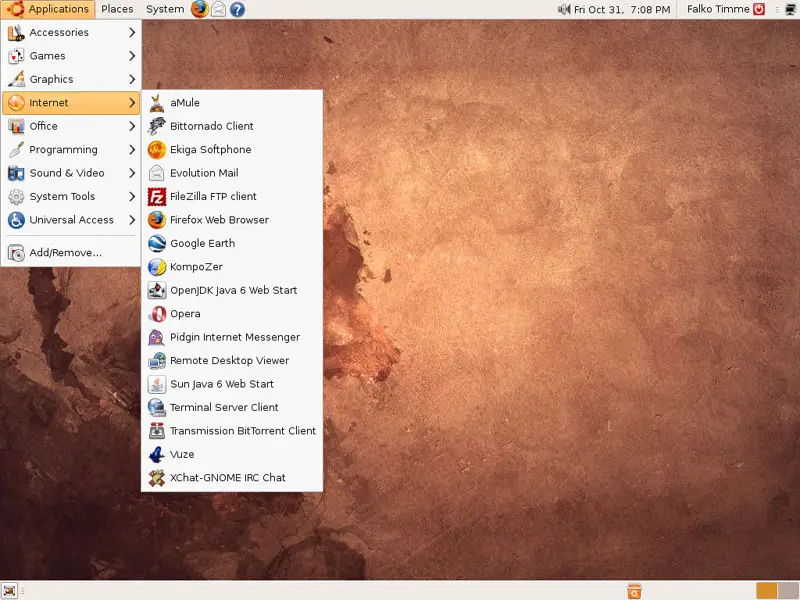
Our inventory should now look like this:
Graphics:
[x] The GIMP
[x] F-Spot
[ ] Picasa
Internet:
[x] Firefox
[x] Opera
[x] Flash Player
[x] FileZilla
[x] Thunderbird
[x] Evolution
[x] aMule
[x] BitTornado
[x] Azureus/Vuze
[x] Pidgin
[x] Skype
[x] Google Earth
[x] Xchat IRC
Office:
[x] OpenOffice Writer
[x] OpenOffice Calc
[x] Adobe Reader
[x] GnuCash
[x] Scribus
Sound & Video:
[x] Amarok
[x] Audacity
[x] Banshee
[x] MPlayer
[x] Rhythmbox Music Player
[x] gtkPod
[x] XMMS
[x] dvd::rip
[x] Kino
[x] Sound Juicer CD Extractor
[x] VLC Media Player
[x] Helix Player
[x] Totem
[x] Xine
[x] Brasero
[x] K3B
[x] Multimedia-Codecs
Programming:
[x] KompoZer
[x] Bluefish
[x] Quanta Plus
Other:
[ ] VMware Server
[x] TrueType fonts
[x] Java
[x] Read/Write support for NTFS partitions
10 Google Picasa
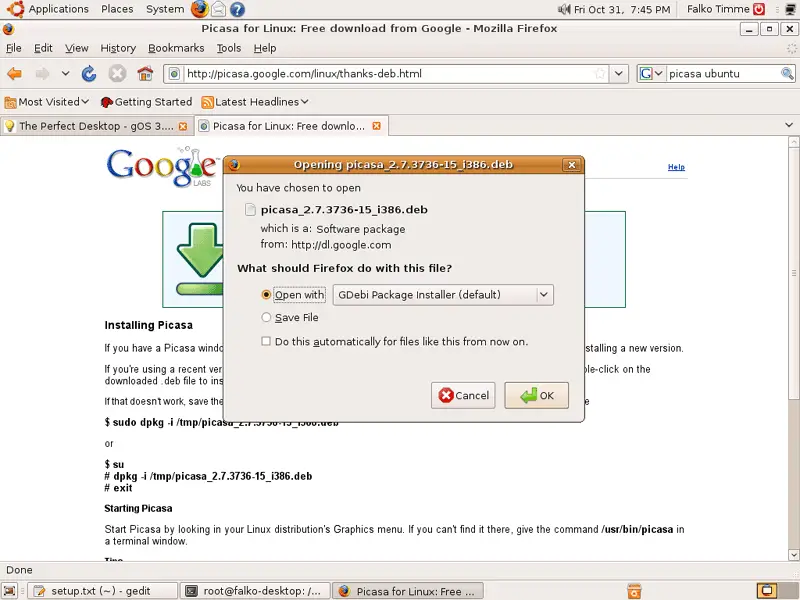
Open Firefox and go to http://picasa.google.com/linux/thanks-deb.html. A download dialogue should come up automatically. Select Open with GDebi Package Installer (default):
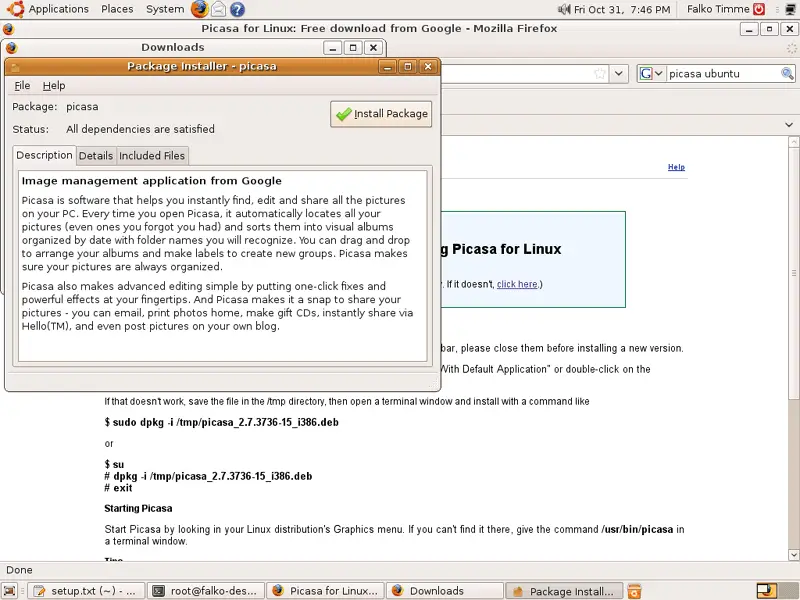
A Package Installer window comes up. Click on the Install Package button to install Picasa:
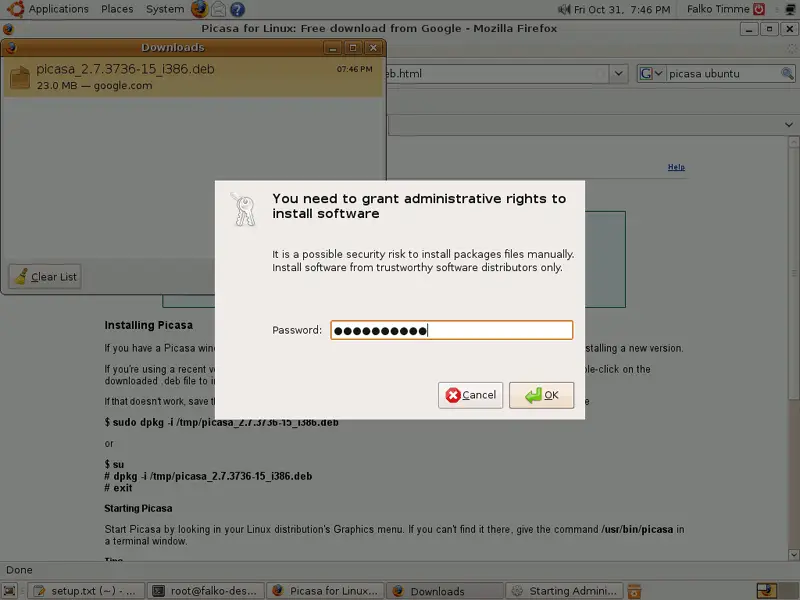
Type in your password:
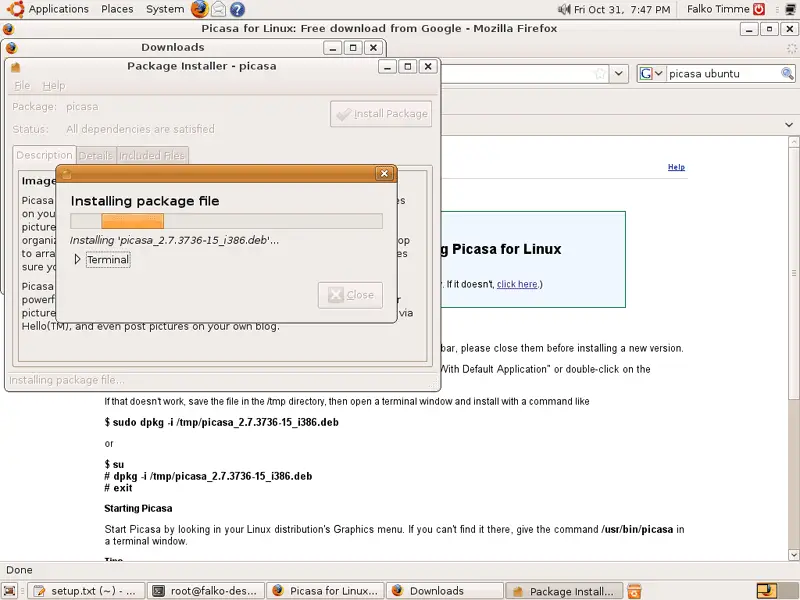
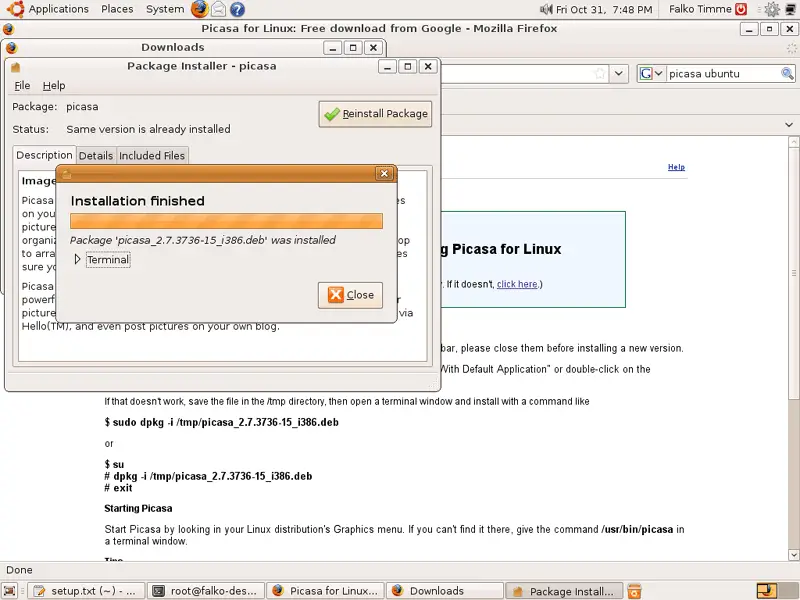
Picasa is now being installed. Afterwards, you can close the Package Installer window:
11 Inventory (III)
Browse the menu again and check what you've got installed so far.
Your list should look like this now:
Graphics:
[x] The GIMP
[x] F-Spot
[x] Picasa
Internet:
[x] Firefox
[x] Opera
[x] Flash Player
[x] FileZilla
[x] Thunderbird
[x] Evolution
[x] aMule
[x] BitTornado
[x] Azureus/Vuze
[x] Pidgin
[x] Skype
[x] Google Earth
[x] Xchat IRC
Office:
[x] OpenOffice Writer
[x] OpenOffice Calc
[x] Adobe Reader
[x] GnuCash
[x] Scribus
Sound & Video:
[x] Amarok
[x] Audacity
[x] Banshee
[x] MPlayer
[x] Rhythmbox Music Player
[x] gtkPod
[x] XMMS
[x] dvd::rip
[x] Kino
[x] Sound Juicer CD Extractor
[x] VLC Media Player
[x] Helix Player
[x] Totem
[x] Xine
[x] Brasero
[x] K3B
[x] Multimedia-Codecs
Programming:
[x] KompoZer
[x] Bluefish
[x] Quanta Plus
Other:
[ ] VMware Server
[x] TrueType fonts
[x] Java
[x] Read/Write support for NTFS partitions





