
Installing Webmin On Ubuntu Feisty Fawn (7.04) - Page 3
This tutorial exists for these OS versions
- Ubuntu 24.04 (Noble Numbat)
- Ubuntu 22.04 (Jammy Jellyfish)
- Ubuntu 20.04 (Focal Fossa)
- Ubuntu 15.04 (Vivid Vervet)
- Ubuntu 7.04 (Feisty Fawn)
On this page
Attempting to start Webmin mini web server..
Starting Webmin server in /opt/webmin/webmin-1.360
..done
***********************************************************************
Webmin has been installed and started successfully. Use your web
browser to go to
https://server1.example.com:23646/
and login with the name and password you entered previously.
Because Webmin uses SSL for encryption only, the certificate
it uses is not signed by one of the recognized CAs such as
Verisign. When you first connect to the Webmin server, your
browser will ask you if you want to accept the certificate
presented, as it does not recognize the CA. Say yes.
[email protected]:/opt/webmin/webmin-1.360$
Thunderbirds Are Go ... Or At Least Webmin Is
Being the paranoid person I am I rebooted my linux box in order to see there were no errors after the install had completed. It also ensures that the service is starting automatically after a server restart. For me, the reboot went successfully. For you it will hopefully do the same. However, if you are on a live system ... do not reboot unless you want the wrath of users to fall on you hard.
sudo reboot
Broadcast message from [email protected] (/dev/pts/1) at 7:05 ... The system is going down for reboot NOW!
Alternatively you can check that webmin is running correctly (without rebooting) by running the following command:
sudo /etc/init.d/webmin status
Which should show something like
webmin (pid 4326) is running
To check it is listening on the correct port (23646 in this case):
sudo netstat -tap
tcp 0 0 *:23646 *:* LISTEN 4326/perl
So What Are You Waiting For?
Log in and use it:
Copy this url into your web browser: https://192.168.0.1:23646/
You should see the following screen
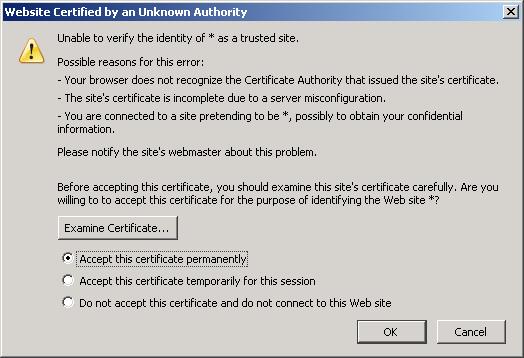
Accept it and click OK.
The logon screen should appear.
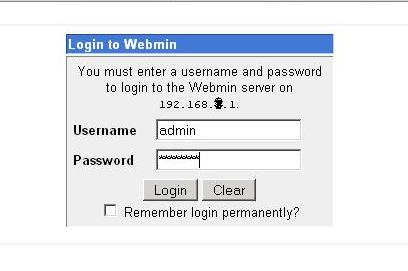
Enter your details:
User: admin
Password: myS3cr3t
Please note: If you use http://192.168.0.1:23646 the following message will appear:
Error - Bad Request
This web server is running in SSL mode. Try the URL
https://192.168.0.1:23646/ instead.





