
Speed Up Your System With Preload On Fedora 8

Do you like HowtoForge? Please consider supporting us by becoming a subscriber.
Submitted by o.meyer (Contact Author) (Forums) on Thu, 2008-03-13 18:35. :: Fedora | Desktop

Speed Up Your System With Preload On Fedora 8

Version 1.0
Author: Oliver Meyer <o [dot] meyer [at] projektfarm [dot] de>
Last edited 02/26/2008

This document describes how to install preload on Fedora 8. Preload is an adaptive readahead daemon - it will monitor which programs you use at the most. Parts of these programs will be cached to speed up their load time.

This howto is a practical guide without any warranty - it doesn't cover the theoretical backgrounds. There are many ways to set up such a system - this is the way I chose.


1 Installation

Install the following package with yum or your preferred yum-frontend.

  • preload


2 Service Settings

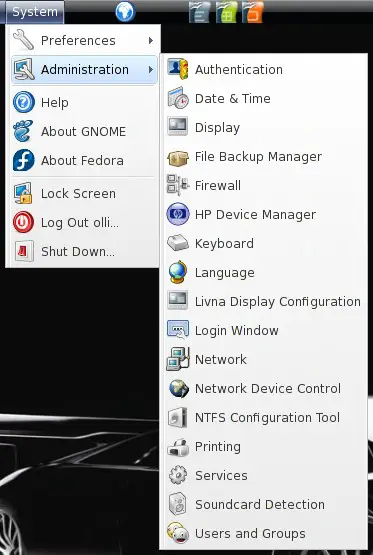
After the installation preload is not running and also deactivated in all runlevels. So open the service settings ...
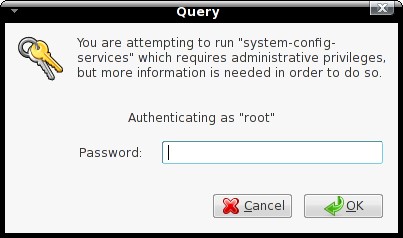
... and enter the root password.
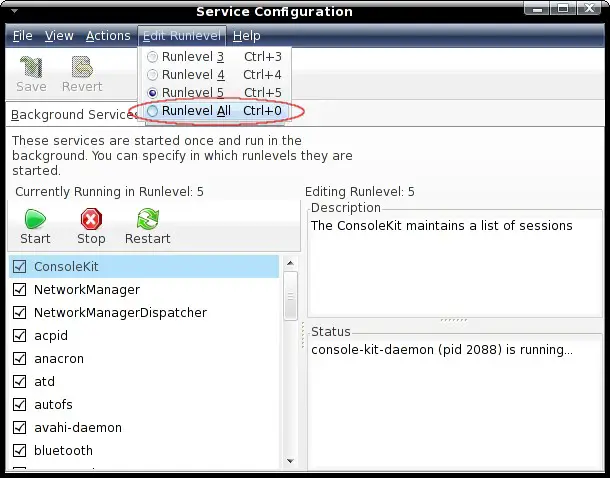
Click on "Edit Runlevel" and choose "Runlevel All".
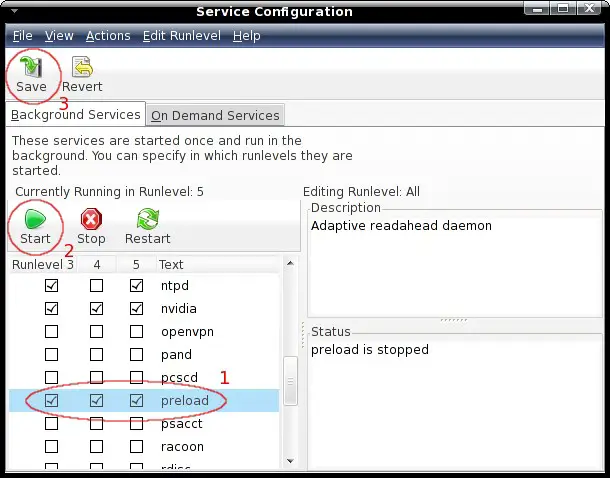
Activate "preload" in all runlevels, start it and save the settings.
 

3 Configuration (Optional)

Usually there's no need to adjust the configuration - but maybe you have a special reason. Before you should make a backup of the file.

cp /etc/preload.conf /etc/preload.conf.orig
vi /etc/preload.conf

The configuration parameters are well described within the configuration file. If you need more detailed information you should take a look at the documentation - chapter 5.2.


4 Performance

It's difficult to say how your system performance will be affected. For sure it'll take some time till preload learned enough to reduce the load time of your applications noticeable. You should take a look at the documentation - starting with chapter 6.


5 Links

Fedora: http://fedoraproject.org/
Preload: http://preload.sourceforge.net/


Please do not use the comment function to ask for help! If you need help, please use our forum.
Comments will be published after administrator approval.
Submitted by bvankuik (registered user) on Wed, 2008-03-19 08:24.

I'm more command-line oriented, and preload wasn't installed on my Fedora system. So I issued the following command to install preload:

sudo yum -y install preload

To make preload run on all runlevels (except runlevel 1): 

sudo chkconfig preload on

And to start it immediately:

sudo service preload on

Sponsored Links: Turn your desk phone and mobile phone into one with Sprint Mobile Integration.
www.seamlessenterprise.com

One number. One voicemail. Seize the lead. Sprint Mobile Integration.
www.seamlessenterprise.com

One Number. One Voicemail.
Make it easier for clients to reach you. Turn your desk phone and mobile phone into one with Sprint Mobile Integration.
www.seamlessenterprise.com

One number. One voicemail. Sprint Mobile Integration.
www.seamlessenterprise.com

One number. one voicemail. Seize the lead with Sprint. Learn more

AT&T Synaptic Compute as a Service. Boost your power on demand.

Trial: IBM Cognos Express Reporting, Analysis & Planning

Learn benefits of Simpana software.
View the Gartner Video

Sprint 4G - The Ultimate Mobile Broadband
Click here

SAP-Business Objects Crystal Reports Server
Complete reporting without hidden costs. Free Trial
