
This tutorial exists for these OS versions
- Debian 10 (Buster)
- Debian 8 (Jessie)
- Debian 7 (Wheezy)
- Debian 6 (Squeeze)
- 0
- Debian 3.1 (Sarge)
On this page
Server Monitoring With munin And monit
Version 1.0
Author: Falko Timme
In this article I will describe how to monitor your server with munin and monit. munin produces nifty little graphics about nearly every aspect of your server (load average, memory usage, CPU usage, MySQL throughput, eth0 traffic, etc.) without much configuration, whereas monit checks the availability of services like Apache, MySQL, Postfix and takes the appropriate action such as a restart if it finds a service is not behaving as expected. The combination of the two gives you full monitoring: graphics that lets you recognize current or upcoming problems (like "We need a bigger server soon, our load average is increasing rapidly."), and a watchdog that ensures the availability of the monitored services.
Although munin lets you monitor more than one server, we will only discuss the monitoring of the system where it is installed here.
This tutorial was written for Debian Sarge, but the configuration should apply to other distributions with little changes as well.
I want to say first that this is not the only way of setting up such a system. There are many ways of achieving this goal but this is the way I take. I do not issue any guarantee that this will work for you!
1 Current Situation
Our system's hostname is server1.example.com, and we have a web site www.example.com on it with the document root /var/www/www.example.com/web.
2 Install And Configure munin
To install munin on Debian Sarge, we do this:
apt-get install munin munin-node
Next, we must edit the munin configuration file /etc/munin/munin.conf. We want munin to put its output into the directory /var/www/www.example.com/web/monitoring, therefore we change the value of htmldir, and we want it to use the name server1.example.com instead of localhost.localdomain in the HTML output, therefore we replace localhost.localdomain with server1.example.com. Without the comments, the changed file looks like this:
vi /etc/munin/munin.conf
dbdir /var/lib/munin |
Next we create the directory /var/www/www.example.com/web/monitoring and change its ownership to the user and group munin, otherwise munin cannot place its output in that directory. Then we restart munin:
mkdir -p /var/www/www.example.com/web/monitoring
chown munin:munin /var/www/www.example.com/web/monitoring
/etc/init.d/munin-node restart
Now wait a few minutes so that munin can produce its first output, and then go to http://www.example.com/monitoring/ in your browser, and you see the first statistics. After a few days this could look like this:
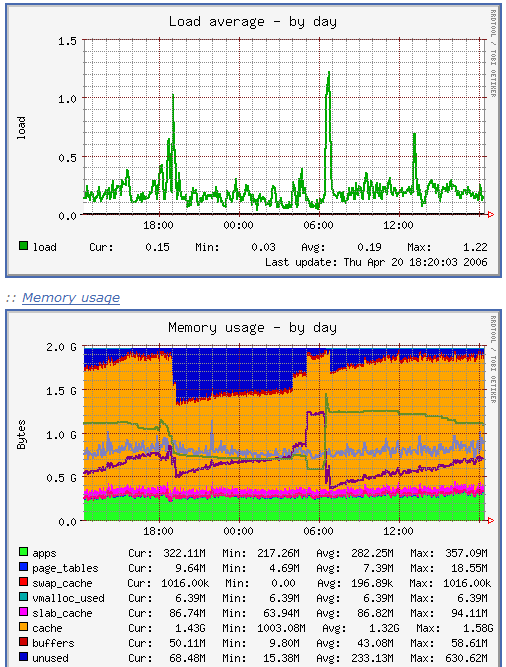
(This is just a small excerpt of the many graphics that munin produces...)
3 Password-Protect The munin Output Directory (Optional)
Now it is a good idea to password-protect the directory /var/www/www.example.com/web/monitoring unless you want everybody to be able to see every little statistic about your server.
To do this, we create an .htaccess file in /var/www/www.example.com/web/monitoring:
vi /var/www/www.example.com/web/monitoring/.htaccess
AuthType Basic |
Then we must create the password file /var/www/www.example.com/.htpasswd. We want to log in with the username admin, so we do this:
htpasswd -c /var/www/www.example.com/.htpasswd admin
Enter a password for admin, and you're done!





