
Server Monitoring With munin And monit On CentOS 5.2 - Page 2
5 Install And Configure monit
Next we install monit:
yum install monit
Then we create the system startup links for monit:
chkconfig --levels 235 monit on
monit's default configuration file is /etc/monit.conf where you can find some configuration examples (you can find more configuration examples on http://mmonit.com/wiki/Monit/ConfigurationExamples) that are all commented out, but it tells monit to also look in the directory /etc/monit.d for configuration files, therefore instead of modifying /etc/monit.conf, we create a new configuration file /etc/monit.d/monitrc. In my case I want to monitor proftpd, sshd, mysql, apache, and postfix, I want to enable the monit web interface on port 2812, I want a https web interface, I want to log in to the web interface with the username admin and the password test, and I want monit to send email alerts to root@localhost, so my file looks like this:
vi /etc/monit.d/monitrc
set daemon  60
set logfile syslog facility log_daemon
set mailserver localhost
set mail-format { from: [email protected] }
set alert root@localhost
set httpd port 2812 and
     SSL ENABLE
     PEMFILE  /var/certs/monit.pem
     allow admin:test

check process proftpd with pidfile /var/run/proftpd.pid
   start program = "/etc/init.d/proftpd start"
   stop program  = "/etc/init.d/proftpd stop"
   if failed port 21 protocol ftp then restart
   if 5 restarts within 5 cycles then timeout

check process sshd with pidfile /var/run/sshd.pid
   start program  "/etc/init.d/sshd start"
   stop program  "/etc/init.d/sshd stop"
   if failed port 22 protocol ssh then restart
   if 5 restarts within 5 cycles then timeout

check process mysql with pidfile /var/run/mysqld/mysqld.pid
   group database
   start program = "/etc/init.d/mysqld start"
   stop program = "/etc/init.d/mysqld stop"
   if failed host 127.0.0.1 port 3306 then restart
   if 5 restarts within 5 cycles then timeout

check process apache with pidfile /var/run/httpd.pid
   group www
   start program = "/etc/init.d/httpd start"
   stop program  = "/etc/init.d/httpd stop"
   if failed host www.example.com port 80 protocol http
      and request "/monit/token" then restart
   if cpu is greater than 60% for 2 cycles then alert
   if cpu > 80% for 5 cycles then restart
   if totalmem > 500 MB for 5 cycles then restart
   if children > 250 then restart
   if loadavg(5min) greater than 10 for 8 cycles then stop
   if 3 restarts within 5 cycles then timeout

check process postfix with pidfile /var/spool/postfix/pid/master.pid
   group mail
   start program = "/etc/init.d/postfix start"
   stop  program = "/etc/init.d/postfix stop"
   if failed port 25 protocol smtp then restart
   if 5 restarts within 5 cycles then timeout
|
(Please make sure that you check processes only that really exist on your server - otherwise monit won't start. I.e., if you tell monit to check Postfix, but Postfix isn't installed on the system, monit won't start.)
The configuration file is pretty self-explaining; if you are unsure about an option, take a look at the monit documentation: http://mmonit.com/monit/documentation/monit.html
In the apache part of the monit configuration you find this:
   if failed host www.example.com port 80 protocol http
      and request "/monit/token" then restart
|
which means that monit tries to connect to www.example.com on port 80 and tries to access the file /monit/token which is /var/www/www.example.com/web/monit/token because our web site's document root is /var/www/www.example.com/web. If monit doesn't succeed it means Apache isn't running, and monit is going to restart it. Now we must create the file /var/www/www.example.com/web/monit/token and write some random string into it:
mkdir /var/www/www.example.com/web/monit
echo "hello" > /var/www/www.example.com/web/monit/token
Next we create the pem cert (/var/certs/monit.pem) we need for the SSL-encrypted monit web interface:
mkdir /var/certs
cd /var/certs
We need an OpenSSL configuration file to create our certificate. It can look like this:
vi /var/certs/monit.cnf
# create RSA certs - Server RANDFILE = ./openssl.rnd [ req ] default_bits = 1024 encrypt_key = yes distinguished_name = req_dn x509_extensions = cert_type [ req_dn ] countryName = Country Name (2 letter code) countryName_default = MO stateOrProvinceName = State or Province Name (full name) stateOrProvinceName_default = Monitoria localityName = Locality Name (eg, city) localityName_default = Monittown organizationName = Organization Name (eg, company) organizationName_default = Monit Inc. organizationalUnitName = Organizational Unit Name (eg, section) organizationalUnitName_default = Dept. of Monitoring Technologies commonName = Common Name (FQDN of your server) commonName_default = server.monit.mo emailAddress = Email Address emailAddress_default = [email protected] [ cert_type ] nsCertType = server |
Now we create the certificate like this:
openssl req -new -x509 -days 365 -nodes -config ./monit.cnf -out /var/certs/monit.pem -keyout /var/certs/monit.pem
openssl gendh 512 >> /var/certs/monit.pem
openssl x509 -subject -dates -fingerprint -noout -in /var/certs/monit.pem
chmod 700 /var/certs/monit.pem
Finally, we can start monit:
/etc/init.d/monit start
Now point your browser to https://www.example.com:2812/ (make sure port 2812 isn't blocked by your firewall), log in with admin and test, and you should see the monit web interface. It should look like this:
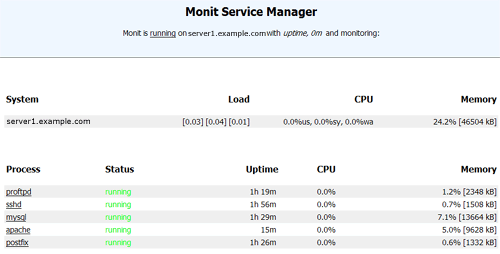
(Main Screen)
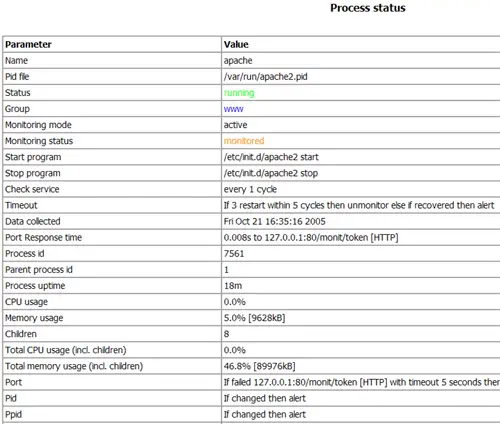
(Apache Status Page)
Depending on your configuration in /etc/monit.d/monitrc monit will restart your services if they fail and send notification emails if process IDs of services change, etc.
Have fun!
6 Links
- munin: http://munin.projects.linpro.no
- monit: http://mmonit.com/monit
- CentOS: http://www.centos.org
- RPMforge: https://rpmrepo.org/RPMforge





