
Samba Fileserver With SWAT On Fedora 8
Version 1.0
Author: Oliver Meyer <o [dot] meyer [at] projektfarm [dot] de>
This document describes how to set up and configure a Samba fileserver on Fedora 8 with the Samba Web Administration Tool (SWAT). The resulting system provides an easy to use fileserver for your Windows network.
This howto is a practical guide without any warranty - it doesn't cover the theoretical backgrounds. There are many ways to set up such a system - this is the way I chose.
1 Preliminary Note
I used a minimal Fedora 8 installation without GUI etc for this howto. Additionally I had to deinstall Firefox after the minimal installation.
- Hostname: server1.example.com
- IP: 192.168.0.100
2 Preparation
2.1 Yum
First we install some packages to speed up yum and prevent problems with packages.
yum install yum-fastestmirror yum-skip-broken
2.2 SELinux
SELinux should be disabled. If you're not sure if it is disabled enter:
cat /etc/selinux/config | grep ^SELINUX=
Disable SELinux if it is enabled:
vi /etc/selinux/config
Set
SELINUX=enforcing
to
SELINUX=disabled
Afterwards reboot the system:
reboot
2.3 Update
Time to update your system:
yum update
3 Samba
Now we install Samba and the Samba Web Administration Tool.
yum install samba samba-swat
4 Basic Configuration
4.1 Firewall
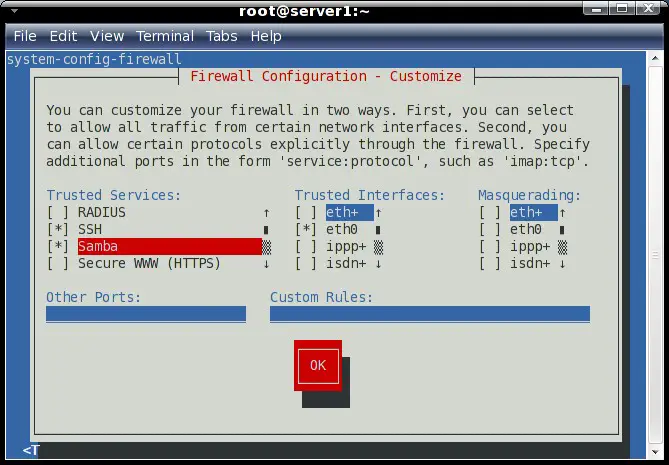
We have to open a few ports so that the clients can connect to Samba:
system-config-firewall-tui
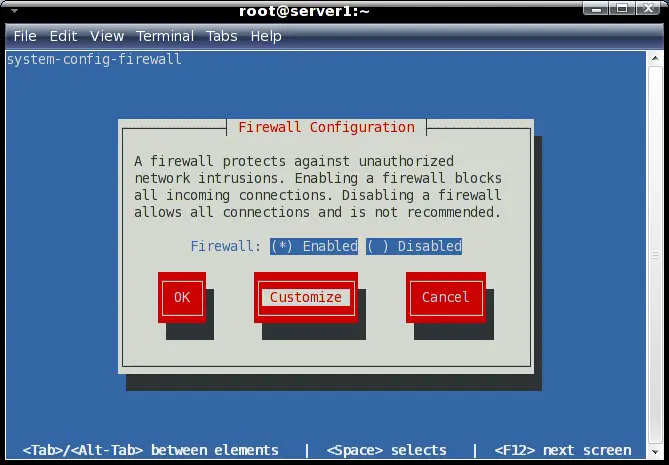
Set Samba as a trusted service.
4.2 Xinetd
If you set up a server without GUI you have to add an additional IP to the swat configuration to use the swat-webinterface.
vi /etc/xinetd.d/swat
Change
only_from = 127.0.0.1
To
only_from = 127.0.0.1 %additional_ip%
4.3 Services
Now we enable the automatic startup of the needed services.
chkconfig smb on
chkconfig nmb on
chkconfig swat on
Afterwards reboot the system.
reboot





