
The Perfect Setup - Fedora Core 5 (64-bit) - Page 3
2 Configure Additional IP Addresses
(This section is totally optional. It just shows how to add additional IP addresses to your network interface eth0 if you need more than one IP address. If you're fine with one IP address, you can skip this section.)
Let's assume our network interface is eth0. Then there is a file /etc/sysconfig/network-scripts/ifcfg-eth0 which looks like this:
vi /etc/sysconfig/network-scripts/ifcfg-eth0
DEVICE=eth0 |
Now we want to create the virtual interface eth0:0 with the IP address 192.168.0.101. All we have to do is to create the file /etc/sysconfig/network-scripts/ifcfg-eth0:0 which looks like this (we can leave out the HWADDR line as it is the same physical network card):
vi /etc/sysconfig/network-scripts/ifcfg-eth0:0
DEVICE=eth0:0 |
Afterwards we have to restart the network:
/etc/init.d/network restart
3 Configure The Firewall
I want to install ISPConfig at the end of this tutorial which comes with its own firewall. That's why I disable the default Fedora firewall now. Of course, you are free to leave it on and configure it to your needs (but then you shouldn't use any other firewall later on as it will most probably interfere with the Fedora firewall).
Run
system-config-securitylevel
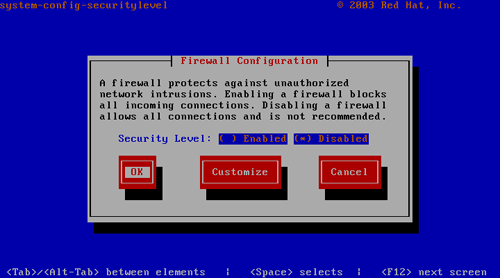
Select Disabled and press OK.
To check that the firewall has really been disabled, you can run
iptables -L
afterwards. The output should look like this:
[root@server1 ~]# iptables -L |
4 Disable SELinux
SELinux is a security extension of Fedora that should provide extended security. In my opinion you don't need it to configure a secure system, and it usually causes more problems than advantages (think of it after you have done a week of trouble-shooting because some service wasn't working as expected, and then you find out that everything was ok, only SELinux was causing the problem). Therefore I disable it (this is a must if you want to install ISPConfig later on).
Edit /etc/selinux/config and set SELINUX=disabled:
vi /etc/selinux/config
# This file controls the state of SELinux on the system. |
Afterwards we must reboot the system:
shutdown -r now
5 Install Some Software
Now we install some software packages that are needed later on:
yum install fetchmail wget bzip2 unzip zip nmap openssl lynx fileutils ncftp gcc gcc-c++





