
The Perfect Setup - CentOS 4.3 (64-bit) - Page 6
11 ProFTPd
ISPConfig has better support for proftpd than vsftpd, so let's remove vsftpd:
yum remove vsftpd
Because CentOS has no proftpd package, we must use a third-party yum repository to install it:
cd /etc/yum.repos.d/
wget http://centos.karan.org/kbsingh-CentOS-Extras.repo
rpm --import http://centos.karan.org/RPM-GPG-KEY-karan.org.txt
Now we can install proftpd:
yum install proftpd
Let's create proftpd's system startup links and start it:
chkconfig --levels 235 proftpd on
/etc/init.d/proftpd start
Then create the file /etc/pam.d/ftp with the following content (otherwise you will not be able to log in with system users using FTP):
vi /etc/pam.d/ftp
#%PAM-1.0 auth required pam_unix.so nullok account required pam_unix.so session required pam_unix.so |
and restart proftpd:
/etc/init.d/proftpd restart
12 Webalizer
To install webalizer, just run
yum install webalizer
13 Synchronize The System Clock
If you want to have the system clock synchronized with an NTP server do the following:
yum install ntp
chkconfig --levels 235 ntpd on
ntpdate 0.pool.ntp.org
/etc/init.d/ntpd start
14 Install Some Perl Modules
ISPConfig comes with SpamAssassin which needs a few Perl modules to work. We install the required Perl modules with a single command:
yum install perl-DBI perl-Net-DNS perl-Digest-SHA1
We also need the module HTML::Parser. We could install the CentOS package perl-HTML-Parser, but this version is too old for the SpamAssassin version that comes with ISPConfig. It would result in the following error message during ISPConfig installation:
REQUIRED module out of date: HTML::Parser
Therefore we must install the latest HTML::Parser using the Perl shell.
Run the following command to start the Perl shell:
perl -MCPAN -e shell
If you run the Perl shell for the first time you will be asked some questions. In most cases the default answers are ok. Because there's no ncftp package for CentOS, the Perl shell cannot find the programs ncftpget and ncftp, and you'll see something like this:
Warning: ncftpget not found in PATH
Where is your ncftpget program? []
Warning: ncftp not found in PATH
Where is your ncftp program? []
It's ok to hit ENTER in both cases.
Please note: If you run a firewall on your system you might have to turn it off while working on the Perl shell in order for the Perl shell to be able to fetch the needed modules without a big delay. You can switch it on afterwards.
Now type in the following command to install the Perl module HTML::Parser:
install HTML::Parser
If the installation is successful, you'll see a line like this at the end:
/usr/bin/make install -- OK
Type
q
afterwards to leave the Perl shell.
15 Update zlib
CentOS comes with an outdated version of zlib (1.2.1) which has a security hole. Therefore we compile and install the newest zlib (1.2.3) from the sources:
cd /tmp
wget http://www.zlib.net/zlib-1.2.3.tar.gz
tar xvfz zlib-1.2.3.tar.gz
cd zlib-1.2.3
./configure --shared
make
make install
16 The End
The configuration of the server is now finished, and if you wish you can now install ISPConfig on it.
16.1 A Note On SuExec
If you want to run CGI scripts under suExec, you should specify /var/www as the home directory for websites created by ISPConfig as CentOS' suExec is compiled with /var/www as Doc_Root. Run
/usr/sbin/suexec -V
and the output should look like this:
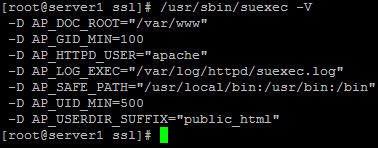
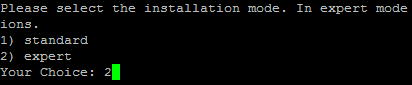
To select /var/www as the home directory for websites during the installation of ISPConfig do the following: When you are asked for the installation mode, select the expert mode.
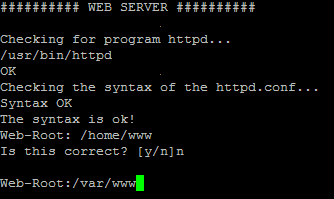
Later during the installation you are asked if the default directory /home/www should be the directory where ISPConfig will create websites in. Answer n and enter /var/www as the home directory for websites.
17 Links
- CentOS: http://www.centos.org
- ISPConfig: http://www.ispconfig.org





