
How To Manage An iPod From A Linux Desktop With Amarok - Page 4
On this page
6 Delete Music On the iPod
To delete music, go to the Devices tab where you should find the contents of your iPod. You can now delete single files or even whole directories. Right-click on the item that you want to delete, and select Delete ... Tracks from iPod:

Confirm your selection by clicking on Delete:

The item is now being deleted. Afterwards, it shouldn't be listed anymore:

7 Unplug The iPod
Close all applications that use your iPod (e.g. Amarok).
There's one thing you must do before you unplug your iPod from your Linux desktop: you must unmount it (otherwise the filesystem on the iPod could suffer). To do so, right-click on the iPod icon in your desktop and select the appropriate item. On PCLinuxOS 2007, it's called Safely Remove. On other distributions, it might be something similar to Unmount or Eject:
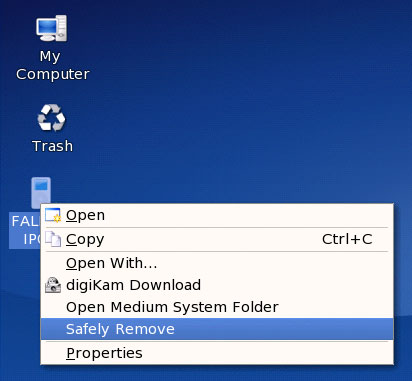
The iPod icon should now disappear. You can now unplug the iPod from your Linux desktop.
8 Links
- Amarok: http://amarok.kde.org





