
Modifying PDF Files With PDFedit On Ubuntu Feisty Fawn - Page 2
On this page
3 Using PDFedit
In this chapter I will show how to do a simple task with PDFedit - fixing a typo in a PDF document.
First start PDFedit (Applications > Graphics > PDF Editor):

This is how PDFedit looks:

Click on the Open button (or press F3) to open a PDF document that you have on your hard disk:

Select the PDF file that you'd like to modify:

Using the green arrow buttons in the upper right corner of PDFedit, you can go to the page of your PDF file that you'd like to change. As you see, I have a typo in my document (I have marked this in the below screenshot - it reads accout, but it should be account):

I pick the Select text tool...

... and mark the text I'd like to change:

In the right window, you can now see a tree of what you've selected (something like Selection > Tj > Parameter 0). Click on Parameter 0, and the selected text appears in the text box in the lower right corner of the PDFedit window. There, you can modify the text:
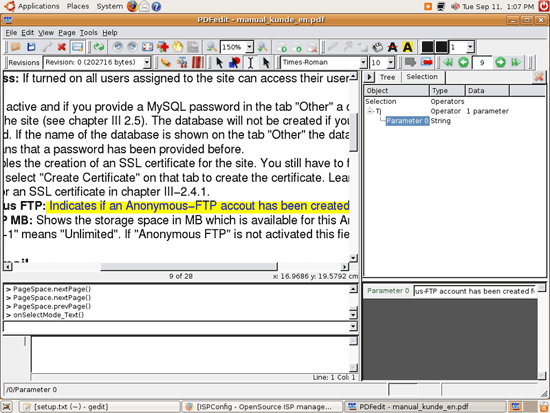
After you've modified the text, right-click on it and choose Select All:

Then right-click on the text again and select Copy:

Now that the modified text is in your clipboard, left-click on the selected text in the main window - it should be replaced with the modified text from your clipboard (I had to scroll back and forth in the main window until the changed text was visible - maybe you have to do the same). As you see, it now reads account:

Click on the Save button to save the modified PDF file (or press F2):

Afterwards, you can open the PDF file in a PDF viewer (e.g. Acrobat Reader) to check if your changes have really been saved (I've marked the modified sentence in the below screenshot so that it is easier for you to find it):

4 Links
- PDFedit: http://pdfedit.petricek.net/pdfedit.index_e
- GetDeb: http://www.getdeb.net
- Ubuntu: http://www.ubuntu.com





